
Instead of reconstructing how you felt after each infusion, use Apple Health for dated activity, sleep, and heart-rate records alongside a separate IV session log. This 2026 workflow helps you compare observations before and after treatment; it does not measure vitamin absorption or prove that IV therapy caused a change.
- To track IV therapy results, Apple Health supplies context—not a validated measure of treatment effectiveness.
- Pair Apple Health records with a dated IV vitamin therapy log; keep provider instructions separate.
- Compare similar days, document other changes, and discuss persistent symptoms with your healthcare professional.
- Oasisbeauty offers IV vitamin therapy in Henderson; Apple Health is a tracking tool, not a treatment assessment.
Why this matters
Feeling different after an infusion and knowing why are separate questions. Sleep, exercise, illness, medication changes, and expectations can affect how you feel and what your device records. A useful log keeps those explanations visible rather than assigning every change to treatment.
Oasisbeauty offers IV vitamin therapy in Henderson, Nevada. Oasisbeauty is best suited to readers seeking IV vitamin therapy care in Henderson, not a health-tracking product. Use your records to support a clinical conversation, not to choose an infusion or diagnose a deficiency yourself.
Apple Health brings supported health data into one place. Its limitation is interpretation: a sleep chart or heart-rate reading cannot tell you whether an infusion was necessary, effective, or appropriate to repeat.
Before you start
- Access: Have an iPhone with the Health app and permission to view the records you plan to compare. An Apple Watch is optional; automatic measurements require a compatible device or app that actually records them.
- Materials: Keep your appointment date, the treatment details supplied by your provider, aftercare instructions, and a private place for session notes. Record ingredients only from the provider's documentation, not from memory.
- The gotcha: Apple Health is not a general-purpose IV appointment journal. Plan to maintain a separate session log, and do not enter an infusion as oral water intake or guess how to classify its ingredients.
For this 2026 setup, start with the information you already collect consistently. Buying another device or adding more categories does not solve missing context.
Choose your tracking method
Both approaches below use the same principle: separate recorded measurements from your interpretation of them.
| Workflow | Best for | Advantage | Limitation |
|---|---|---|---|
| Apple Health records plus a manual session log | Readers who already collect health data on an iPhone | Keeps dated measurements available alongside treatment notes | Requires manual review; the records do not establish treatment effectiveness |
| Wearable-fed Apple Health records plus a manual session log | Readers who already wear a compatible device consistently | Reduces manual measurement entry where supported | Missing wear time and measurement conditions can distort comparisons |
Choose the workflow you can maintain consistently. A wearable is optional, and neither approach provides a vitamin-level measurement or a medical verdict.
Health data selection
The first configuration unit is your comparison set: which records will you examine, and which question will each record answer? Keep that set small enough to review without searching through unrelated charts.
- Open Health on your iPhone. Use Search, or Browse on layouts that show that tab, to find the categories below.
- Open Sleep if you already have sleep records. Check whether the dates cover your intended comparison period and whether the source records sleep consistently.
- Open Heart Rate if a connected source records it. Treat individual readings as observations, not as evidence of an infusion response.
- Open Steps to give your activity context. A quiet day and a strenuous day are not equivalent comparison conditions.
- Open Show All Data within a category when you need to inspect individual entries. Check dates and sources before relying on an apparent change.
Expected result: You know which categories contain usable records, which dates have gaps, and where the measurements came from. An empty category stays out of your comparison; it is not a reason to invent a baseline.
Set a practical comparison window
Use 7 days before an appointment and 7 days after as a manageable logging window. These are organizational choices, not a validated clinical protocol or a claim about how long IV therapy works.
If you have no earlier records, begin with your next ordinary day. Do not reconstruct sleep or symptoms from vague recollection. Mark the earlier period as unrecorded and build a usable history from that point.
IV session log
Your session log supplies the context Apple Health cannot infer from a chart. Use a private note or document, and keep the same fields for each appointment.
- Create a note titled IV session log. That is a suggested note title, not an Apple Health feature.
- Add Session details: appointment date and time, provider, and treatment details copied from your clinical paperwork. Keep the paperwork available for questions about ingredients or dose.
- Add Baseline: the concern you want to discuss, how it affects daily activities, and whether it was present before the appointment. Describe observable limits instead of writing only that you felt bad.
- Add Daily observation: sleep experience, usual activities, symptoms, and anything notably different that day. Aim for 1 entry per day, at a consistent point in your routine.
- Add Other changes: illness, travel, unusual exercise, alcohol, medication changes, and other treatments. Include only what is relevant; the note does not need to become a complete diary.
- Add Provider instructions: aftercare guidance and whom to contact with concerns. Follow those instructions rather than adapting your care around a chart.
Expected result: Each appointment has a dated record that distinguishes what was administered, what you noticed, and what else changed.
Do not label a symptom as a side effect or a treatment benefit before it has been assessed. Write what happened and when. That wording preserves information without turning a personal observation into a medical conclusion.
Before-and-after review
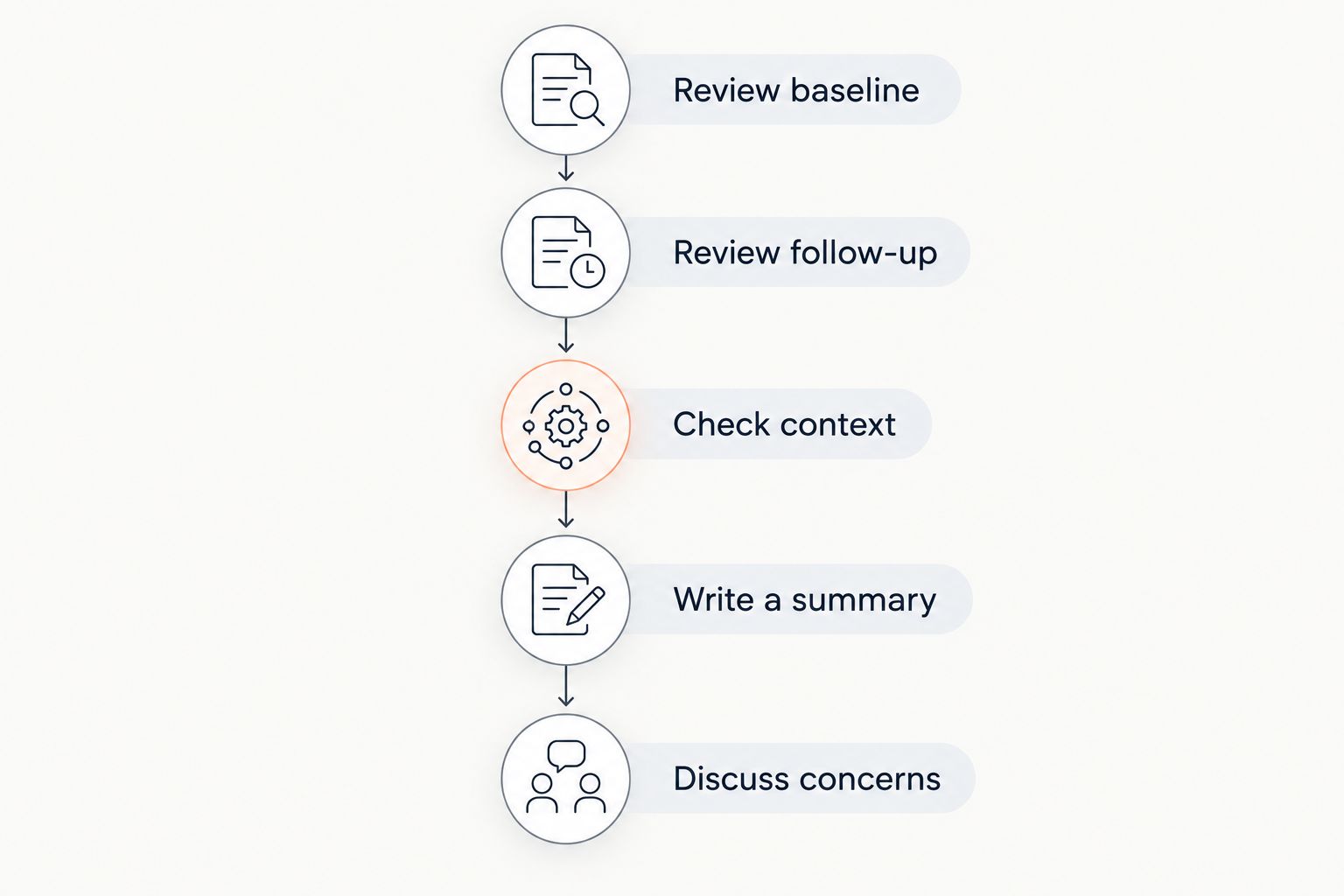
This unit turns separate records into a readable summary. The goal is a clearer question for your healthcare professional, not a score that rates the infusion.
- Review baseline. Read your pre-appointment notes before looking at the later period. Identify the original concern so the review does not shift toward whichever chart looks most interesting.
- Review follow-up. Examine the same Health categories across both periods. Compare like with like; do not compare an isolated heart-rate reading with a daily summary.
- Check context. Look for missing device wear, changed routines, illness, or other treatments. Mark those dates instead of quietly excluding them because they weaken your preferred explanation.
- Write a summary. State what changed, what stayed similar, and what remains uncertain. Keep subjective observations separate from device-recorded measurements.
- Discuss concerns. Bring persistent symptoms, new symptoms, and questions about further treatment to a qualified healthcare professional. Do not use the comparison to change prescribed medication or arrange repeat infusions yourself.
Expected result: You have a brief, dated summary that another person can understand without interpreting every chart on your phone.
For a 2026 review, keep the original entries intact. If you later correct a date or discover a device gap, note the correction rather than rewriting the history to fit your conclusion.
Repeat the workflow after another appointment
A repeat appointment adds a second timeline, not a controlled experiment. Keep the original log structure so that the records remain comparable.
Create a new session entry, record the treatment details again, and reuse the same observation fields. Do not assume the contents were identical to a previous visit. If the provider changes the treatment, document that change from the supplied records.
Best for repeat appointments: reuse your questions, not your conclusions. An earlier improvement does not establish that another infusion will produce the same result.
Review whenever new Health data appears
If a compatible source already sends measurements to Apple Health, continue the same manual review after new records appear. The measurement collection can happen automatically; your appointment notes and interpretation still need attention.
Check that the new data covers the relevant dates before updating your summary. Do not describe this as an automatic IV-results integration: a newly recorded sleep session has no built-in explanation connecting it to an infusion.
Troubleshooting
Sleep or heart-rate charts are empty
An empty chart means there are no records to review for that category and period. Check that your connected device or app actually measures the category and has permission to write it to Health.
Do not backfill guessed readings. Continue with the session log and the categories that contain real records.
Steps look unexpectedly high or inconsistent
Multiple sources can contribute activity data, and source handling matters. Open Steps, then Data Sources & Access, to inspect contributing sources and their order.
Review the source configuration before comparing days. Avoid adding manual entries merely to make a chart match what you expected.
A chart improved, but you feel worse
A favorable-looking chart does not override symptoms. Record what you are experiencing and contact your healthcare professional for guidance rather than averaging the concern away.
Seek urgent medical attention for symptoms such as trouble breathing, chest pain, or fainting. Do not wait for a tracking period to end or for an app to flag a problem.
Appointment dates do not match the comparison
Travel, late-night appointments, and incorrect manual dates can put observations in the wrong window. Check the appointment confirmation and the timestamps on individual records.
Correct your session note where necessary and explain the correction. Keep the distinction between the treatment date and the date you entered the note.
You cannot find a category or control
Health layouts differ across software versions. Use Search where available, or locate the category through Browse, rather than looking for an IV-specific dashboard.
If the category exists but has no records, navigation is not the problem. Recheck the recording source instead.
Customize your workflow
For your 2026 routine, add detail only when it answers a clinical question. A longer log is not automatically a better log.
- Best for symptom discussions: describe the effect on ordinary activities. A concrete description gives more context than an unexplained wellness score.
- Best for overlapping treatments: record each intervention separately. Combining appointments into one entry makes their timing harder to distinguish.
- Best for privacy: show only the relevant records during your appointment. Review sharing permissions before connecting another app or granting access to a device.
- Best for treatment decisions: bring the provider's treatment documentation with your summary. Your notes cannot substitute for a medical history, examination, or testing when those are needed.
For an appointment with Oasisbeauty, ask which observations are relevant to your concern and how to report problems after treatment. Do not assume the practice receives your Apple Health data automatically.
FAQ
How do I track IV therapy results with Apple Health?
Use Apple Health for supported measurements and keep a separate, dated IV session log. Compare the same categories before and after the appointment, while recording symptoms and other changes. The comparison cannot establish that treatment caused a difference.
Can Apple Health measure whether IV vitamins worked?
Apple Health cannot determine whether IV vitamins worked. Sleep, activity, and heart-rate records provide context, but they do not measure vitamin absorption or diagnose a deficiency.
Do I need an Apple Watch to track an IV therapy appointment?
You do not need an Apple Watch to maintain an appointment log. Automatic health measurements require a compatible recording source, and the available categories depend on that source.
Can I automatically send IV appointments into Apple Health?
Do not assume that an appointment system can send IV treatment details into Apple Health. Keep a separate session log unless your provider or a connected app explicitly documents a supported connection and explains what it transfers.
Should I enter an IV infusion as water in Apple Health?
Do not enter an IV infusion as oral water intake. Keep the treatment details in your session log and follow the provider’s documentation rather than guessing how to classify the infusion.
How long should I track before and after IV therapy?
A practical diary can cover 7 days before and 7 days after an appointment. That window is an organizational suggestion, not a validated effectiveness test or a reason to delay care for symptoms.
Can I share Apple Health records with Oasisbeauty?
Ask Oasisbeauty how the practice accepts health information before sending records. You can prepare a brief summary and show relevant records during your appointment without assuming an electronic connection exists.
One last thing
Write down what would count as a useful change before the appointment. Otherwise, it is easy to select whichever later observation supports the result you hoped for.
Keep that question attached to every 2026 session entry. The most useful output is not a better-looking chart; it is a clearer account of your symptoms, daily function, and questions for your healthcare professional.